?
Examples Capabilities FAQ Solver
PolymathPlus logo
PolymathPlus Numerical solver for science & engineering Numerical solver for science & eng.

Solve math problems with precision & ease

Use a friendly and expressive syntax, powered by proven deterministic solvers Skip debugging large Python-style programs Let your AI chat-box build syntax you can actually read, verify, and run with confidence.

Try Solver Register Now  free gift

Try instantly as guest, or register free to save work and remove guest limits. Open the solver instantly as a guest. No account required for a quick trial. Register to be able to save your work, and remove guest limits. Now free for all users !!

Built by Polymath veterans
By the team behind Polymath solver.
Coursework ready
Equations, ODEs, Regressions, etc.
Comprehensive reports
Tables, charts, stats and more.
Software development encouraged by CACHE, the Computer Aids for Chemical Engineering Education Corporation for over 3 decades, part of the American Institute of Chemical Engineers.

From readable model input to verified numerical output.

PolymathPlus gives students, instructors, and engineers a structured solving workflow: enter the model, run a deterministic solver, then inspect the generated report.

See Examples

Solver Examples

Explore these examples to learn the simple problem entry syntax. Each example popup shows the problem input in the left panel and the solution output in the right panel.

Linear equations sample solution in PolymathPlus Nonlinear equation sample solution in PolymathPlus Differential equation sample solution in PolymathPlus Data integration sample solution in PolymathPlus Curve fitting sample report in PolymathPlus Numerical solver sample report in PolymathPlus Equation system sample report in PolymathPlus Data fitting sample output in PolymathPlus Regression sample solution in PolymathPlus

Sample


PolymathPlus Sample

Site Licenses

Site registration is still required, even though access to the software is now provided for free. Site licenses allow institutions to install the desktop version on their public lab computers and give their users the ability to store programs online, supporting better collaboration and availability.

New Site Registration

To initiate the registration of a new site, please reach out to us and provide the following details:

  Detail Example
1. Site name Arizona State University
2. IT contact email john123@asu.edu
3. Backup email abra2759@asu.edu
4. Email extension/s @asu.edu, @student.asu.edu
5. Site Address ABC College
123 University Avenue
College Town, CA 98765
United States

Once you provide these details, we will set up your site and provide an access key that you can use to enter the Site Admin page where you can manage users and get the instructions to install the desktop version on your lab computers.

Support and FAQ

Our support team typically replies to common requests/queries within two business days. For technical questions, enhancement requests, or bug reports, email admin@polymathplus.org with a brief description and any screenshots.

Below you'll find common support questions and answers:

1 What is PolymathPlus?

PolymathPlus is math-solving software designed for students, scientists, and engineers, built to handle various numerical problems such as nonlinear equations, ordinary differential equations, linear/polynomial/nonlinear curve-fitting regression, and more.

At its core, it is a deterministic computational engine that applies well-established, rigorously validated numerical algorithms to solve mathematical and engineering models. For the same model and inputs, it produces reproducible results, which is essential for verification, traceability, and design confidence. This is fundamentally different from heuristic AI systems, which can generate variable outputs and may not always provide the consistency or numerical reliability required for engineering problem-solving.

Our goal is to deliver a user-friendly yet powerful math-solving tool that remains accessible and affordable for users around the world. With PolymathPlus, you can enter a math problem in plain text and instantly receive a numeric solution accompanied by a comprehensive report—all with a single click.

2 Is PolymathPlus free?

PolymathPlus offers a free, feature-rich online package.

You can try the solver immediately as a guest — no account needed. A free registration is required to access all solver packages without guest limits.

The free package is designed for individual users. Organizations are asked to register their site for their users.

3 Can I use PolymathPlus on my phone or tablet?

Yes — PolymathPlus works on virtually any modern device.

The online version works through all major browsers—including Chrome, Safari, Opera, Firefox, and Edge—on both Windows and macOS laptops and desktops. You can also access PolymathPlus on Android and iOS smartphones or tablets using the supported web browsers.

chrome logo   safari logo   opera logo   firefox logo   edge logo

For users with paid licenses, we also offer a dedicated Windows desktop version.

4 How can I use AI to help write PolymathPlus programs?

You can use an AI assistant such as ChatGPT, Gemini, Claude, or Copilot to help convert a plain-language engineering or math problem into PolymathPlus source code. This works especially well because PolymathPlus syntax is deliberately simple, making AI-generated source much easier to review, troubleshoot, and validate than a full Python or MATLAB program.

For best results, first provide the context that teaches the AI the supported PolymathPlus program types, syntax rules, examples, and common repair steps. To copy the PolymathPlus AI context, use the button below.

Copy the PolymathPlus AI context

Once copied, paste that context into your AI assistant chat box, then describe the problem you want to solve in natural language. The AI should help you produce a valid PolymathPlus program.

ChatGPT Gemini Claude Copilot Python MATLAB PolymathPlus

This workflow combines the strengths of both tools: AI helps draft the source quickly, while PolymathPlus provides deterministic numerical solving for engineering-grade reliability, reproducibility, and precision.

5 I have an old Polymath 6.x license that no longer works. What are my options?

The legacy Polymath 6.x software is no longer supported, as the organization behind it has been dissolved. PolymathPlus was developed by a new, independent organization, maintaining full backward compatibility with the syntax of Polymath 6.1. At the same time, it delivers major advancements in algorithm optimization, capabilities, and underlying technology.

PolymathPlus is available online as a web application in both free and paid versions. The paid desktop version is offered with affordable Std and Pro licenses for individual users.

6 I purchased an individual license for PolymathPlus. What changed in the offering model?

PolymathPlus is now offered as a free online service. Users who previously purchased individual licenses can continue using the Windows desktop version available in their Profile page, although this download is no longer provided to the general public.

In addition, former Std and Pro users retain the ability to store programs online without the storage limits applied to new free‑tier users.

7 Which mathematical algorithms does PolymathPlus use?

PolymathPlus uses well-established, finely tuned numerical solver algorithms.

These algorithms have been rigorously tested over more than 20 years of solving real-world engineering problems.

8 What is the history of PolymathPlus?

The core development team of PolymathPlus also created the earlier Polymath application, which was widely utilized as a numerical solver package within the global community of Chemical Engineers.
The development was also encouraged by:

CACHE The Computer Aids for Chemical Engineering Education Corporation, as part of the
AIChE The American Institute of Chemical Engineers

After the dissolution of the Polymath team/organization, the principal developer took the initiative to rekindle the project. Drawing from more than 25 years of software development and extensive research in numerical packages, a new package was crafted.

9 Does PolymathPlus offer a desktop version package?

PolymathPlus is currently offered as an online service only. Users who previously purchased licenses may continue using the legacy Windows desktop version, but we are not distributing or updating it.

Our present focus is on the online platform unless a significant need and supporting resources justify a new desktop release in the future.

10 What is the 'Site Admin' page, and who can use it?

The Site Admin page is designed for IT administrators who manage a site license. Access requires a dedicated access key.

The page provides guidance on configuring the site license and tracking license distribution and usage.

11 How do I get a site license for my organization?

To register a new site, please ✉ contact us with the following information:

  1. Site name (i.e. Arizona State University)
  2. IT contact email and backup email
  3. Email extension(s) for the organization (i.e. @asu.edu, @student.asu.edu)
  4. Site address

We will then provide an access key. The Site Admin IT contact can use this key to access the Site Admin page, where they can manage licenses, and follow deployment instructions.

This enables granting or licenses to site users for online access or on-site desktop use.

12 How can I link my existing account to a site license my organization purchased?

First, go to the PolymathPlus website and log in (or register if you haven’t already).

Then:

  1. Open your Profile page (via the link in the menu bar).
  2. In the Licenses section at the bottom, check - 'Claim Site License'
  3. Enter the site-license key provided by your IT administrator.
  4. Click the button to Save the profile.
  5. Log out and then log back in.
  6. You should now see the license type and your organization’s name in the title/status bar of the Solver page.

Note: The site-license key is intended only for authorized members of your organization.

13 Installing the desktop application on Windows (STD and PRO licenses)

The desktop installer MSI package can be downloaded from the profile page once on STD or PRO licenses.
Please note these important points when installing the desktop application:

  1. If an older version is installed, uninstall it via Control Panel (Add/Remove Programs).
  2. It is recommended to confirm the installer's file integrity.
    You can do so by comparing the SHA256 value on the website with this PowerShell command output.
    Get-FileHash "SetupPolymathPlus_7057.msi" -Algorithm SHA256
  3. When launching the MSI, if you see a "Windows protected your PC" message, follow these:
  4. The message "User Account Control: Do you want to allow this app to make changes to your device?" is a Windows security feature that appears before an application makes administrative changes. To proceed with the installation, click "Yes".

Troubleshooting: Getting Object reference error when trying to log-in on desktop app

When you use Tools > Login in the desktop application, you may encounter the error: "Object reference not set to an instance of an object", and the application crashes.

This is a known bug in the older desktop release version SetupPolymathPlus_7051.msi.
To resolve this issue, please download and install the latest version from your profile page.

If you still wish to use an older version, please follow these steps to bypass the issue and complete the registration:

  1. Open the application and go to Tools > Login.
  2. Make sure the "Remember Me" checkbox is selected when entering your email and password, then click OK.
  3. The first time you do this, you may still see the "Object reference" error and the program may crash.
  4. Relaunch the application and repeat the login process via Tools > Login.
  5. Registration should now complete successfully and be confirmed in the lower-right corner of the status bar.

Troubleshooting: Desktop application fails with WebView2 controllers compatibility

The Windows desktop application relies on the Microsoft Edge WebView2 Runtime. If Edge is not already installed on your computer, you will need to install the WebView2 Runtime separately.

If the application errors with 'The system cannot find the file specified (0x80070002)', download and install the WebView2 Runtime from the Microsoft link below:
Download webview2 WebView2 Evergreen Bootstrapper

14 Troubleshooting: Too many steps in routine or step size underflow

This error occurs when the solver's adaptive step-size control reduces the step size excessively, preventing the equation set from converging. This results in the solver taking too many steps without reaching a solution.

To resolve this, try the following steps:

  1. First ensure the equations are entered correctly as intended. For example: unintentionally using multiplier instead of division: a/b*c vs. a/(b*c)
  2. Verify that all variables are scaled appropriately, ensuring uniformity in magnitude.
  3. Verify unit conversions
  4. Consider reducing the integration range between t(0) and t(f)
  5. You may consider switching to another solving algorithm. You can do these steps by using program hints.
    ODE solution method algorithm indexes are: 0=RKF45, 1=RKF56, 2=BS, 3=Stiff, 4=StiffBS.
    The default solution is 1=RKF56. Here's an example for hint to change to Stiff.
    #@DEQ_SOLUTION_METHOD_INDEX = 3
  6. Finally, in rare cases, you may consider adjusting the step size parameters for better efficiency.
    You can do these steps by using program hints.
    Sample hints to control the step size and the error tolerance:
    #@DEQ_RKF_H = 1E-06
    #@DEQ_RKF_TETOL = 1E-06
    #@DEQ_EPS = 1E-05
    #@DEQ_H1 = 0.001

15 How can I support PolymathPlus?

We are seeking sponsors to improve PolymathPlus for universities, organizations, and communities worldwide.

Organizations interested in sponsoring our activities can ✉ contact us directly.

Equations Solver

Nonlinear Equations Solver

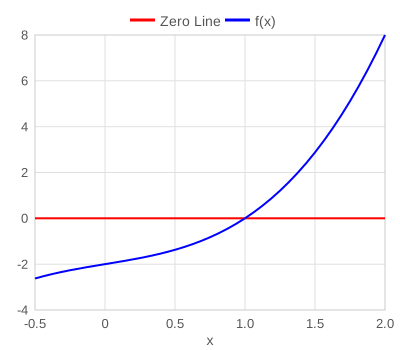
When solving nonlinear equations—whether a single equation or a system—write each equation so it equals 0 (root-finding form) and provide an initial guess for each variable. In other words, express each equation as 𝑓(𝑥)=0 and supply an initial guess for every nonlinear variable.

Here's a quick example showing how to set up and enter the data for solving two simultaneous nonlinear equations:

x2 + y = 12
2x + log(y+2) = 5

The unknown variables are x and y.

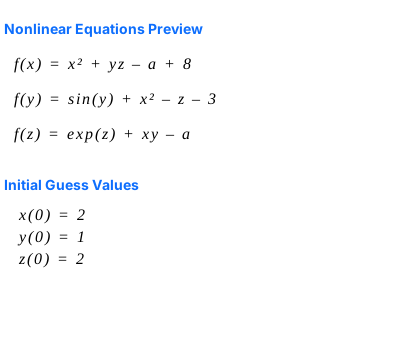
Below are the root expressions, each corresponding to one of the unknowns, along with initial estimates—both set to 1.

# nonlinear root expressions f(x) = x^2 + y - 12 f(y) = 2x + log(y+2) - 5 # initial estimates for x and y x(0) = 1 y(0) = 1
Any part of a line starting with # is treated as a user comment. It's ignored during evaluation and has no effect on the calculations.
With implicit multiplication syntax, you may omit the multiplication operator * in some cases. For example, 2x is equivalent to 2*x.

You can also define auxiliary expressions to help simplify long formulas. In the example below, we define a as an auxiliary expression—meaning it's treated as a separate, explicit variable that other expressions can reference. You don't need to provide initial guesses for auxiliary explicit variables—they're automatically computed from the nonlinear variables with provided initial guesses.

f(x) = x^2 + y - 12 f(y) = 2x + a a = log(y+2) - 5 # initial estimates for x and y x(0) = 1 y(0) = 1

When solving a single nonlinear equation—even if you include as many explicit helper variables and expressions as you like—the way you set the starting values is a bit different. Instead of giving just one guess, you need to provide both a minimum and a maximum estimate for the variable.

Take a look at this example where we solve a nonlinear equation to find the value of V.

f(V) = (P+a/(V^2))*(V-b)-R*T P = 56 R = 0.08206 T = 450 a = 27*(R^2*405.5^2/111.3)/64 b = R*405.5/(8*111.3) V(min) = 0.4 V(max) = 1

Linear Equations Solver

When solving multiple linear equations, you can enter them in the standard format—just as you'd normally write them. There's no need to rearrange the equations or provide any initial guesses. Simply ensure that all the equations are truly linear.

Here's an example of three linear equations being solved simultaneously:

a + 2c = 50
b = –2 + c
a + 23c = 12 + b

The following equations should be entered into PolymathPlus to solve the system described above:

a + 2*c = 50 b = -2 + c a + 23*c = 12 + b

Using implicit multiplication simplifies the syntax:

a + 2c = 50 b = -2 + c a + 23c = 12 + b

Differential Equations

PolymathPlus is designed to solve systems of simultaneous initial value problems (IVPs) involving first-order ordinary differential equations (ODEs).

Higher-order differential equations can be transformed into systems of first-order equations using standard mathematical techniques. Likewise, partial differential equations (PDEs) can be converted into ODEs for numerical solution using methods such as the method of lines.

Each equation in PolymathPlus must be written in first-order form, where the derivative of a dependent variable is isolated on the left-hand side and expressed as an algebraic function of independent and dependent variables. This structure ensures compatibility with the program's numerical solvers.

Consider this set of ordinary differential equations to be solved:

{ x' = x + 4 t2 y' = y x 5y

Given these initial and boundary conditions:

x0 = 1 , y0 = 4 , at t0 = 0 , with integration ending at tf = 1

The equations can be entered in PolymathPlus using the following syntax:

x' = x + 4*t^2 y' = sqrt(y) - x/(5-y) x|1 y|4 t|0:1

You can also use either of the following two compatible syntax formats for the same problem:

d(x)/d(t) = x + 4*t^2 d(y)/d(t) = sqrt(y) - x/(5-y) x(0) = 1 y(0) = 4 t(0) = 0 t(f) = 1
dx/dt = x + 4t^2 dy/dt = sqrt(y) - x/(5-y) x(0) = 1 y(0) = 4 t(0) = 0 t(f) = 1

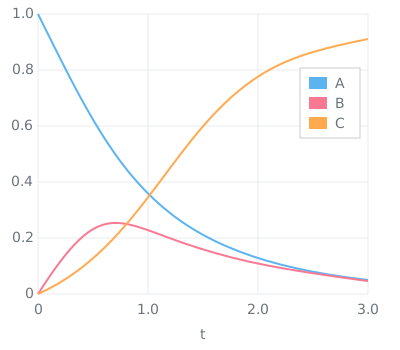
The output shows a table of results along with an integration chart.

ode4.png

In addition to differential equations, PolymathPlus allows users to define explicit variables—algebraic expressions that depend on differential variables, the independent variable, and/or other explicit variables, provided no circular dependencies exist. These variables are computed directly from known values and can be used to simplify equations, define intermediate results, or support the overall structure of the model.

The example below illustrates a typical input format for solving a system of ordinary differential equations (ODEs) in PolymathPlus, including the use of explicit variables.

{ T' = 0.8 (500T) + rA (40000) 40·5 x' = rA /5 y' = 0.015 (10.5x) T450 1 2y
k= 0.5· exp ( 5032 ( 1450 1T ) ) CA= 0.271 (1x) 450T 1 10.5x y CC= 0.271·0.5x 450T 1 10.5x y Kc= 25000 exp ( 40000 8.314 ( 1450 1T ) ) rA= k ( CA2 CCKc )
T0=450 x0=0 y0=1 W0=0 Wf=20

To enter this system of equations into PolymathPlus, you can use the following syntax:

# differential equations (ODE) T' = (0.8*(500-T)+rA*(-40000))/(40*5) x' = -rA/5 y' = -0.015*(1-0.5*x)*(T/450)/(2*y) # explicit variables / equations k = 0.5*exp(5032*(1/450-1/T)) CA = 0.271*(1-x)*(450/T)/(1-0.5*x)*y CC = 0.271*.5*x*(450/T)/(1-0.5*x)*y Kc = 25000*exp((-40000)/8.314*(1/450-1/T)) rA = -k*(CA^2-CC/Kc) # initial values for the dependent # differential variables T | 450 x | 0 y | 1 # initial and final values for the # independent variable W | 0 : 20

When using implicit multipliers syntax, we can simplify the expressions to:

# differential equations (ODE) T' = (0.8(500-T) + rA(-40000))/(40*5) x' = -rA/5 y' = -0.015(1 - 0.5x)(T/450)/(2y) # explicit variables / equations k = 0.5 exp(5032(1/450-1/T)) CA = 0.271(1-x)(450/T)/(1-0.5x)*y CC = 0.271*0.5*x(450/T)/(1-0.5x)*y Kc = 25000 exp((-40000)/8.314*(1/450-1/T)) rA = -k(CA^2-CC/Kc) # initial values for the dependent # differential variables T | 450 x | 0 y | 1 # initial and final values for the # independent variable W | 0 : 20

Curve Fitting

PolymathPlus supports curve fitting for linear, polynomial, multi-linear, and nonlinear regression. The report evaluates model variables, generates a regression chart and residual plots, and provides statistics on model accuracy.

Below is an example of the data entry required to solve a linear regression model for a given set of data points.
This example demonstrates a polynomial regression model of order 1 (i.e., linear regression), which finds the best-fitting linear equation for the given data points.

# Linear regression example # Straight line fit BOD vs Time [ t BOD 1 0.6 2 0.7 4 1.5 6 1.9 8 2.1 10 2.6 12 2.9 14 3.7 16 3.5 18 3.7 20 3.8 ] Time = t + 10 polyfit Time BOD 1

lin_reg_0.png

Nonlinear Regression

Below is an example of a data entry for solving nonlinear regression model for a given set of data points. The model variables to be found are a and b, for which we should also provide an initial guess.

The model eqaution to fit is as follows:

y = a x b + x

The data entry for this nonlinear regression model is as follows:

# Example: Nonlinear Regression [ x y g 0.5 1.255 1.2 0.387 1.25 1.3 0.24 1.189 1.4 0.136 1.124 2 0.04 0.783 2.1 0.011 0.402 2.2 ] # Nonlinear regression model nlinfit y = a * x / (b + x) # Initial guess of the # regression model variables a,b m(a) = 2 m(b) = 1

and the solution becomes:

nlinreg_ex01.png

Discrete Integration

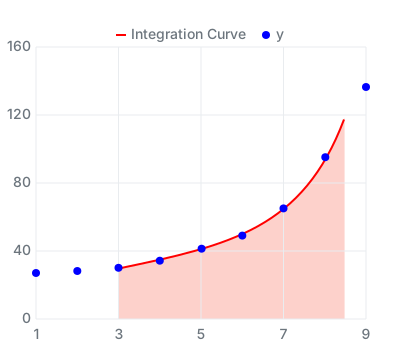
PolymathPlus can calculate a definite integral from known discrete data points. The solver interpolates the supplied x-y data, builds a continuous curve from those points, and calculates the area under the curve over the requested interval. This is useful when the function is known through measurements, tabulated data, or simulation output rather than through a closed-form equation.

The default settings are designed to work well in almost all practical cases. Advanced users can still override the defaults by choosing the interpolation method and the number of sub-sections used for the numerical integration. Increasing the number of sub-sections can improve accuracy for rapidly changing curves, while simpler interpolation may be preferred for piecewise-linear data.

[ x t 1 1.7 2 2.9 3 4.9 4 8.4 5 14.2 6 24.1 7 41.0 8 69.8 9 118.6 ] y = t+25 # Integration model integrate y(x) 3 8.6

In this example, PolymathPlus integrates y(x) from x = 3 to x = 8.6. By default, it uses Akima interpolation with Simpson integration and 100 sub-sections.

3.0 8.6 y(x)dx = 312.0
Discrete integration chart and report in PolymathPlus

Optional forms provide direct control when needed: use integrate y(x) 2 3 90 akm for Akima interpolation over 2-3 with 90 sub-sections, integrate y(x) 1 2 50 ccs for CCS interpolation over 1-2 with 50 sub-sections, or integrate y(x) 5 9 80 lin for linear interpolation over 5-9 with 80 sub-sections.

Constrained Optimization (NLP)

PolymathPlus solves constrained nonlinear programming (NLP) problems. It minimizes a nonlinear objective function by adjusting model variables within user-defined bounds and constraints. Once the lowest feasible objective value is found, the software generates summary reports, charts, and statistics to evaluate the quality of the model fit.

To set up an NLP problem, start by specifying the objective function you want to minimize using the min: keyword. Constraints are added as expressions that must equal zero for equality constraints (use ... = 0), or be greater than zero for inequality constraints (use ... > 0). Write each constraint as a mathematical expression followed by the appropriate comparison.
Please Note: Be sure to rewrite each constraint so that all terms appear on one side of the equation or inequality, leaving zero on the other side.

A key requirement for the NLP solver is to provide bounds for each variable. For every variable, you must enter an initial guess, a lower bound, and an upper bound in the following format: variable | guess lower_bound upper_bound
This helps the solver search only within the meaningful range for your model.

The following example demonstrates how to set up a constrained optimization problem. Here, the objective is to minimize a squared distance function subject to nonlinear inequality constraints that define the feasible region.

Mathematically, the problem is formulated as:

minimize: (x2)2+(y3)2 subject to: xy2 x2+y225 0x,y10

The corresponding data entry and the solution report are as follows:

# objective function to minimize min: (x - 2)^2 + (y - 3)^2 # region constraints x*y - 2 > 0 25 - x^2 - y^2 > 0 # Initial guess and bounds x|1.6 0 10 y|1.3 0 10

nlp_01.png

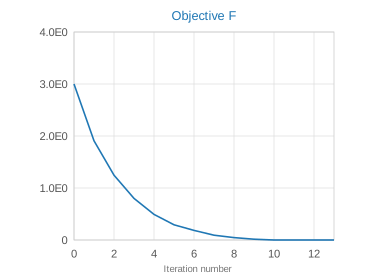
Since the global minimum of the function is located at (2,3) and this point satisfies all constraints (where 2×3=62 and 22+32=1325), the solver converges to the optimal value of min f*0.

LSQ Optimization

Least Squares (LSQ) optimization is a specific type of nonlinear programming (NLP) used to fit mathematical models to observed data. The main goal is to minimize the sum of squared differences (residuals) between the actual data points and the values predicted by the model. This approach is widely used in scientific modeling, as it provides a quantitative measure of how well the model matches the data under various equality and inequality constraints.

To perform LSQ optimization in PolymathPlus, you provide a set of observed data points and define a mathematical model that describes the relationship between variables. The solver then adjusts the model parameters to find the best fit, minimizing the total squared error.

Below is an example of how to enter data for a least squares optimization problem. In this example, the model uses a saturation kinetics form (which is commonly applied in enzyme kinetics and other scientific fields). The objective is to find the parameter values that make the model curve fit the data points as closely as possible.

The saturation kinetics form model:

y Vmaxx Km+x

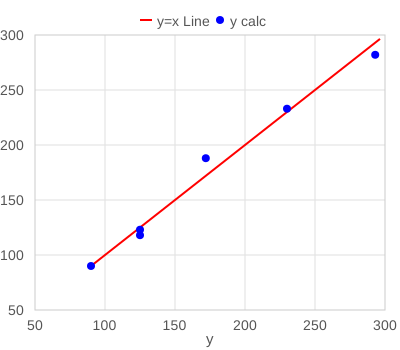
The equation above represents a common model used to describe how a response variable y changes with respect to an independent variable x, where - we seek to find the best fitting model variables Vmax (represented by a) and Km (represented by b), by minimizing the residuals of calculated ycalc values compared to the observed y data points.

ycalc = a x / ( b + x )

In the PolymathPlus program, we should define the data-table of the known variable. We should also define the model expression to optimize using the fit: keyword followed by the math expression.

fit: y = a*x/(b + x)

The program will attempt to find the best suited model variables a and b, by minimizing the sum of squared residuals:

minimize: ( ycalc y ) 2

Here is the PolymathPlus program to solve the LSQ optimization problem described above:

[ x y 0.05 0.1818 0.10 0.3333 0.20 0.5714 0.50 1.0000 1.00 1.3333 2.00 1.6000 ] # LSQ minimization fit fit: y = a*x/(b + x) # Initial guess and lower/upper bounds a|1.5 0 5 b|0.3 0 5

and the solution becomes:

nlp_02a.png

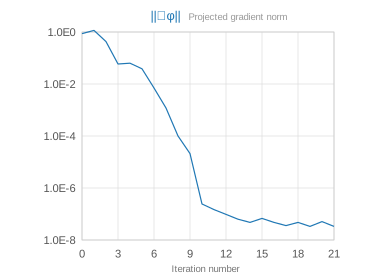
The verified solution for this dataset yields a ≈ 2.0 (representing Vmax) and b ≈ 0.5 (representing Km). By evaluating the residual plots provided in the report, users can confirm that the error is randomly distributed, indicating that the nonlinear model chosen is an appropriate fit for the data.

The program solution report includes charts to visualize the accuracy of the fit:

nlp_02b.png

About Us

PolymathPlus began as a Windows desktop application and expanded its offerings to include an online web application. Our passion and dedication drive us to continually innovate and refine our solutions. We are committed to providing a top-notch numerical solver package to tackle mathematical challenges with ease and confidence.

admin@polymathplus.org
sales@polymathplus.org
Email us to schedule a call
  Pre-scheduled calls only
08:00-10:00 AM ET
Maintenance Status

The development of our software had been encouraged by CACHE - The Computer Aids for Chemical Engineering Education Corporation, as part of the American Institute of Chemical Engineers.

AIChE CACHE

Drawing from more than 25 years of software development and extensive research in numerical packages, we have crafted the new PolymathPlus package. We maintain ties with many US-based universities and colleges, as well as institutions across other regions worldwide.

Our Vision

Deliver the premier user-friendly, advanced math solver—accessible and affordable worldwide—the first choice for learners, professionals, and enthusiasts.

Research

Our research is dedicated to advancing numerical methods and optimization techniques to strengthen the capabilities of PolymathPlus. The following key research areas highlight their potential impact across disciplines commonly applied in science and engineering, particularly in design, modeling, and control.

Optimization

Optimization solvers find a function's minimum or maximum. Engineers often apply classical numerical methods like Gradient Descent, Conjugate Gradient, BFGS, and L-BFGS to solve these problems efficiently. These algorithms improve convergence and reduce computation time, especially for smooth, differentiable functions and large-scale systems.
To tackle Constrained optimization problems (where seeking the optimal maximum or minimum of a function while satisfying variable constraints), engineers use classical methods like the Augmented Lagrangian approach, Generalized Reduced Gradient (GRG), and Karush-Kuhn-Tucker (KKT) conditions. These techniques are designed to handle complex systems with multiple constraints, ensuring feasible and efficient solutions

PDE Solvers

Solving partial differential equations is central to modeling physical phenomena in engineering and science — from heat transfer and fluid dynamics to structural mechanics and electromagnetics. Robust numerical algorithms are developed to tackle these equations efficiently and accurately.
Common approaches include finite difference methods for structured grids, finite element methods for complex geometries, and spectral methods for high-precision solutions. These techniques enable engineers to simulate and analyze systems governed by PDEs across a wide range of applications.

Simplex

The Simplex method solves linear programming problems by moving along the edges of feasible solutions to find the optimal one.
Enhancing Simplex algorithms with advanced pivot rules, degeneracy handling, and dual simplex implementations to handle large-scale linear optimization problems more efficiently. Research includes interior-point methods and revised simplex algorithms for improved numerical stability.

ODE Optimizers

Developing specialized solvers for boundary value problems and parameter optimization in ordinary differential equations, including shooting methods and multiple shooting techniques.
Combining advanced regression techniques with ODE solvers for better model fitting in dynamic systems, enabling parameter estimation in complex mathematical models.

Chebyshev and Fourier

Chebyshev and Fourier transformations are mathematical tools used to represent functions using orthogonal basis sets. They enhance numerical solvers for discrete data, improving accuracy and computational efficiency in interpolation and approximation. These transformations also enable advanced solvers by replacing discrete data with continuous function representations.

These research efforts represent our ongoing commitment to improving computational mathematics. While we work to incorporate these advancements into PolymathPlus, we aim to provide users with reliable and efficient tools for solving complex mathematical problems.

Ready to solve your own model?

Start solving as a guest, then register for free to unlock more features.

Using an AI Assistant?

To build PolymathPlus programs with an AI assistant, provide the full ✨ AI context in the chat, then describe the problem you want to solve.


Terms and Conditions PolymathPlus does not warrant that the functions contained in the program will meet your requirements or that the operation of the program will be uninterrupted or error-free. In no event will PolymathPlus or its distributors or their dealers be liable to you for any damages, including any lost profit, lost savings, or other incidental or consequential damage. Please read the Terms of Service (TOS) below for further details.